
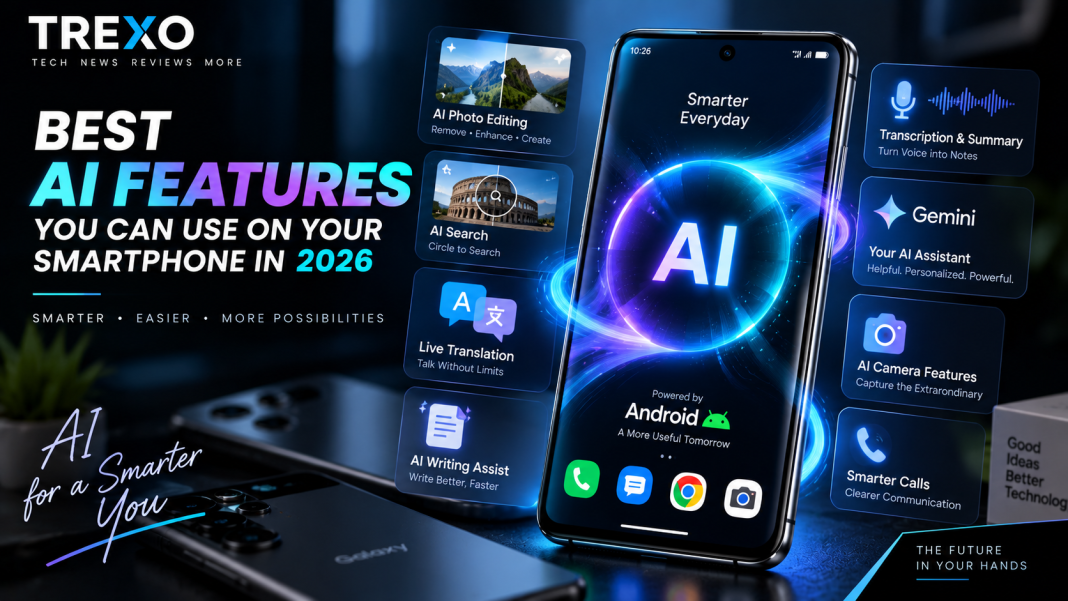

Artificial intelligence is becoming a normal part of the smartphone experience. In 2026, AI on phones is no longer limited to chatbots or experimental camera effects. It can help edit photos, translate conversations, summarize recordings, search what’s on your screen and assist with everyday tasks.
However, not every feature marketed as “AI” is equally useful. Here are some of the most practical AI features on smartphones in 2026 and what they can actually do.
- AI Photo Editing
Photo editing is one of the most immediately useful applications of smartphone AI.
Modern AI editing tools can help remove unwanted objects, reposition or resize subjects, improve framing and generate missing parts of an image.
Samsung’s current Photo Assist, for example, includes tools for object removal, reframing and rescaling.
These tools won’t replace professional editing software in every situation, but they can make everyday photo corrections considerably easier.
- Smarter Visual Search
Instead of describing something you see on your phone, modern Android devices can let you search directly from the screen.
Google’s Circle to Search allows users to circle, tap or highlight something and search for information about it without manually switching between applications.
In 2026, Google expanded the feature with multi-object image recognition on supported devices, allowing several items in an image to be identified and explored together.
This can be particularly useful for identifying products, locations, clothing and unfamiliar objects.
- Live Translation and Interpreter Features
AI-powered translation is becoming increasingly integrated into smartphones.
On compatible Samsung Galaxy devices, Live Translate can translate supported phone calls, while Interpreter is designed for real-time conversations between people speaking different languages.
Availability varies by device, language and region, so users should check which languages their particular smartphone supports.
For travellers and people who regularly communicate across languages, these tools can be much more useful than a traditional standalone translation app.
- AI Writing Assistance
AI can also help when you’re typing on your smartphone.
Samsung’s Writing Assist, for example, can provide spelling and grammar corrections, translation and suggestions for changing writing style.
Similar AI writing capabilities across smartphone apps can help with emails, messages, notes and other everyday text.
The important point is to review AI-generated writing before sending it. AI can still misunderstand context or introduce incorrect information.
- Voice Recording, Transcription and Summaries
Recording a meeting or lecture is easy. Finding the important information inside a long recording is much harder.
That’s where AI transcription can be genuinely useful.
Samsung’s Transcript Assist can convert supported voice recordings into text and provide translation and summarization capabilities.
For students, professionals and anyone who regularly records discussions, this can save considerable time compared with manually reviewing an entire recording.
- More Capable AI Assistants
Smartphone assistants are moving beyond simple commands such as setting alarms or checking the weather.
Google announced Gemini Intelligence for Android in 2026, designed to make supported devices more proactive while giving users control over their data and interactions. Its rollout began with newer Samsung Galaxy and Google Pixel devices.
Google has also demonstrated Gemini handling certain multi-step tasks on supported devices and apps, although availability can depend heavily on region, device and whether a feature is still in beta.
For a broader look at modern AI models and what they can do, read our ChatGPT 5.6 Explained guide.
Internal link: Link ChatGPT 5.6 Explained to your existing TREXO ChatGPT article.
- AI Camera Assistance
AI doesn’t only edit a photograph after you’ve taken it. Smartphone manufacturers also use computational processing and AI techniques during image capture.
Depending on the phone, software can help with areas such as low-light processing, subject recognition, stabilization and image enhancement.
The important distinction is that good AI processing cannot completely compensate for weak camera hardware. Sensor quality, lenses and image processing all contribute to the final result.
If you’re interested in Samsung’s latest combination of cameras and Galaxy AI, read our Samsung Galaxy S26 FE coverage.
Internal link: Link Samsung Galaxy S26 FE to your published S26 FE article.
- AI Call and Communication Tools
AI is increasingly being used to make phone calls easier to manage.
Samsung’s current Galaxy AI feature set includes Call Assist capabilities such as transcription and translation, while newer Galaxy implementations also include tools designed to help users understand or manage incoming calls.
Features differ significantly between brands and countries, so users should not assume that every AI calling feature is available on every Android phone.
- On-Device AI vs Cloud AI
Not every smartphone AI feature works in the same way.
Some processing can happen directly on the phone, while other tasks require information to be processed using online services.
On-device processing can offer benefits such as lower latency and, depending on implementation, reduced need to send certain information to remote servers. Cloud processing, meanwhile, can provide access to larger AI models and more computational power.
When using sensitive information with any AI service, check its privacy controls and understand whether the feature processes information locally or online.
- Do You Really Need AI in Your Next Smartphone?
AI should not be the only reason to buy a smartphone.
Battery life, display quality, camera hardware, performance, software support, repairability and price remain important.
But useful AI features can make a good phone more convenient. Photo editing, translation, transcription and contextual search are examples where AI can already save users time.
The best approach is to consider which features fit your actual needs rather than choosing a device simply because it has an “AI phone” label.
Final Thoughts
The most useful smartphone AI features in 2026 aren’t necessarily the most futuristic ones.
Tools that help you search what’s on your screen, edit a photograph, translate a conversation, improve writing or summarize a recording can provide practical benefits in everyday use.
At the same time, availability varies between manufacturers, devices, countries and languages. AI-generated results can also make mistakes, so important information should still be checked.
As smartphone AI continues to develop, the real question isn’t how many AI features a phone has—it’s how many of them actually make your daily tasks easier.